Oracle 12cR2 Silent Install
silent install is much faster and cuts down time
What actually makes it faster 🚀
1️⃣ No GUI = no waiting
-
No OUI screens
-
No mouse clicks
-
No UI rendering delays
👉 Installer runs directly in background, faster on:
-
Servers
-
VMs
-
Cloud instances
Create response file under /tmp with bellow details:
oracle#vi /tmp/12c_response.rs
oracle.install.responseFileVersion=
/oracle/install/rspfmt_dbinstall_response_schema_v12.2.0oracle.install.option=INSTALL_DB_SWONLY
ORACLE_HOSTNAME=prmUNIX_GROUP_NAME=oinstallINVENTORY_LOCATION=/u01/app/oraInventorySELECTED_LANGUAGES=enORACLE_HOME=/u01/app/oracle/product/12.2.0.1ORACLE_BASE=/u01/app/oracleoracle.install.db.InstallEdition=EEoracle.install.db.OSDBA_GROUP=dbaoracle.install.db.OSOPER_GROUP=dbaoracle.install.db.OSBACKUPDBA_GROUP=dbaoracle.install.db.OSDGDBA_GROUP=dbaoracle.install.db.OSKMDBA_GROUP=dbaoracle.install.db.OSRACDBA_GROUP=dbaSECURITY_UPDATES_VIA_MYORACLESUPPORT=falseDECLINE_SECURITY_UPDATES=trueoracle.installer.autoupdates.option=SKIP_UPDATES
Start the run installer in silent mode to begin the installation
cd /u02/databaserunInstallerrun runInstaller in Silent mode./runInstaller -ignoreSysPrereqs -showProgress -silent -responseFile /tmp/12c_response.rsp
Once installation is completed, run the root scripts and you can move to DBCA create database.
Oracle 12c GUI Install
Start the runInstaller and follow the below screens to install Oracle 12cR2 software
cd /u01/database
./runinstaller
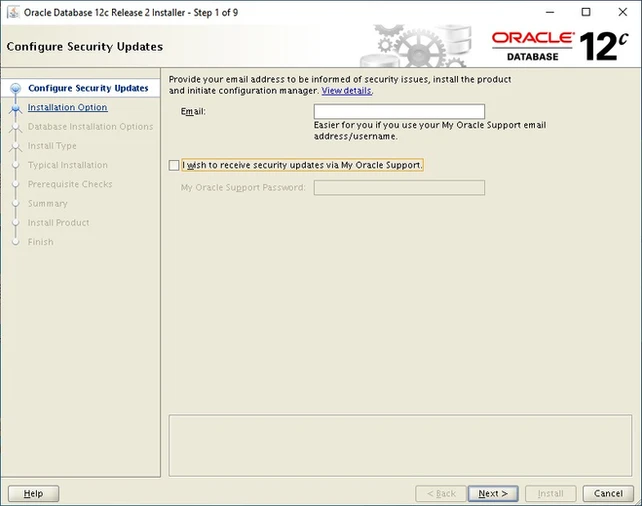
Uncheck to disable receiving security updates and click on next. You will get a warning, just click OK to proceed